You are sitting with three assignments due tomorrow. Your notes are a mess. Your brain is fried. And your classmate just turned in a research paper that looks like it took a week — but they finished it in three hours.
What is their secret?
AI.
Not cheating. Not shortcuts. Smart use of AI to get ahead in college — and you can do it too, starting today, even if you have never used an AI tool before in your life.
This guide is written for absolute beginners. No tech background needed. No expensive tools required. Just a student who wants better grades, less stress, and more time to actually enjoy college.
Let’s get into it.
Table of Contents
What Does “Using AI to Get Ahead in College” Actually Mean?
Before anything else, let’s clear something up.
Using AI to get ahead in college does not mean having a robot write your essays for you. It does not mean cheating your way through exams.
It means using AI as a study partner. A research assistant. A writing coach. A time manager.
Think of it like this — having a really smart friend available 24/7 who helps you understand hard topics, gives you feedback on your writing, and helps you organize your week.
That is what AI for college students looks like in 2026.
And here is the exciting part: most of these tools are free or nearly free. You just need to know where to start.
Why Every College Student Needs to Start Using AI Right Now
Here is a truth no one tells you during orientation:
The students who learn to use AI tools for studying in college will have a massive advantage — in grades, in internships, and in careers.
AI is not going away. In fact, more than 65% of employers now say they want graduates who are comfortable working with AI tools. Starting college is the perfect time to build that skill.
And yet, most students either do not know where to begin or are scared of doing something wrong.
This guide fixes that.
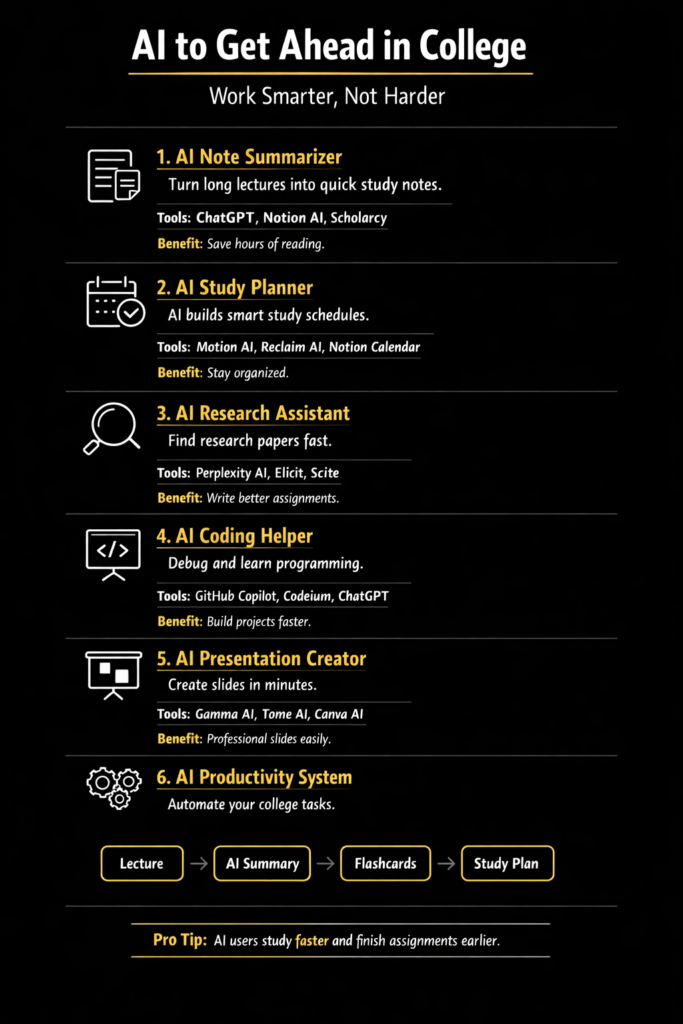
The Best AI Tools for College Students (Free and Easy to Use)
You do not need to download anything complicated. Here are the most beginner-friendly AI tools for students right now:
- ChatGPT (by OpenAI) — Free to use. Great for explaining concepts, summarizing content, brainstorming essay ideas, and practicing for exams. This is usually the best starting point for beginners.
- Google Gemini — Built into Google’s ecosystem. Helpful if you already use Google Docs and Gmail.
- Claude (by Anthropic) — Known for longer, more thoughtful responses. Great for reading long documents and getting detailed explanations.
- Perplexity AI — Designed for research. It gives you answers with sources, which is super helpful for academic work.
- Grammarly — Not a chatbot, but an AI writing assistant that fixes grammar, tone, and clarity as you type.
Start with one. Do not try all of them at once. Most beginners do best starting with ChatGPT simply because it has the most tutorials and community help available online.
Step-by-Step Guide: How to Start Using AI to Get Ahead in College
Step 1 — Create Your Free Account
Go to chat.openai.com and sign up with your email. It takes less than two minutes. The free version is enough to get started.
That is it. You are in.
Step 2 — Learn the One Skill That Changes Everything: Prompting
A prompt is what you type into the AI. The quality of your prompt decides the quality of your answer.
Bad prompt: “Explain photosynthesis”
Better prompt: “Explain photosynthesis in simple terms like I am a first-year biology student who is confused about the light and dark reactions”
See the difference? The more context you give, the better the answer.
Here are some beginner prompt templates you can use right now:
- For studying: “Explain [topic] in simple words like I am a complete beginner. Give me 3 real-life examples.”
- For essays: “I am writing an essay about [topic]. Help me create a simple outline with 5 main points.”
- For exam prep: “Quiz me on [subject]. Ask me 10 multiple-choice questions and give me the answers after I try.”
- For reading comprehension: “Summarize this text in bullet points and highlight the 3 most important ideas: [paste your text]”
Practice these four templates for one week. You will feel like a completely different student.
Step 3 — Use AI to Understand Difficult Lectures
Have you ever sat through a class and understood nothing?
After class, open ChatGPT and type:
“I just had a lecture on [topic]. I did not understand [specific part]. Can you explain it step by step in very simple language?”
Then read the response. If you still do not get it, ask a follow-up:
“Can you give me an analogy to help me understand this better?”
This is one of the most powerful ways to use AI for learning in college. You are not replacing your professor. You are just getting a second explanation — one tailored to your exact confusion.
Step 4 — Use AI as a Writing Assistant (Not a Ghostwriter)
Here is where many students misunderstand AI.
Using AI to write your entire essay is risky and defeats the purpose of learning. Most universities now have AI detection policies.
But using AI to help you improve your writing? That is completely legitimate and incredibly effective.
Here is how to do it properly:
First, write a rough draft yourself. It does not have to be good. Just write something.
Then paste it into ChatGPT with this prompt:
“Here is my rough draft. Please give me feedback on clarity, structure, and flow. Do not rewrite it. Just tell me what to improve and why.”
Read the feedback. Make the changes yourself. Your writing improves, and the work stays yours.
This is exactly how professional writers use AI. Not to replace thinking — to sharpen it.
Step 5 — Build a Weekly Study Plan Using AI
Most students waste hours not knowing what to study. AI can fix this in under five minutes.
Try this prompt:
“I have exams in [subject 1], [subject 2], and [subject 3] in three weeks. I can study 2 hours a day. Help me create a realistic study schedule that covers all the topics and includes revision days.”
ChatGPT will give you a weekly plan broken down by subject, topic, and time.
Print it out. Put it on your wall. Now you always know exactly what to study next.
Step 6 — Use AI to Ace Group Projects
Group projects are the worst — or they used to be.
AI can help you divide work fairly, create project outlines, draft emails to professors, summarize everyone’s notes, and even prepare your presentation script.
Here is a prompt that works really well for group project preparation:
“We are working on a group project about [topic]. Help us create a project plan with clear tasks, deadlines, and who should do what based on these roles: [list your group’s roles].”
Suddenly, the most chaotic part of college gets a lot more manageable.
Step 7 — Use AI for Career Prep While Still in College
Most students wait until their final year to think about careers. That is a mistake.
You can start using AI to get ahead in college for career preparation from your very first semester.
Here is how:
For resume building: “Help me write a resume summary for a first-year college student studying [major] with no work experience but strong academic achievements.”
For internship applications: “Help me write a cover letter for a [job title] internship at [company]. My relevant skills are [skills]. Keep it under 250 words.”
For interview prep: “Give me 10 common interview questions for a [field] internship and help me write strong answers.”
Starting this early gives you a massive head start over students who wait until graduation.
Common Mistakes Beginners Make When Using AI in College
Knowing what not to do is just as important.
Mistake 1 — Pasting AI answers directly into assignments. Do not do this. AI content detectors are everywhere now, and the academic consequences are serious. Use AI to learn and improve, not to submit.
Mistake 2 — Trusting everything AI says. AI makes mistakes. Always verify important facts with credible academic sources. Treat AI like a helpful but sometimes wrong friend.
Mistake 3 — Using vague prompts. “Write me an essay” gives you a generic, useless response. Be specific about your topic, course level, word count, and what you need.
Mistake 4 — Using AI only for big tasks. Some of the best use cases are small: quickly explaining a formula, brainstorming five title options, or summarizing two pages of dense text. Use it daily.
Mistake 5 — Ignoring your college’s AI policy. Every university has different rules. Know what your institution allows before you use AI in graded work.
How AI Helps with Specific College Subjects
[1] AI for STEM Students
If you study science, technology, engineering, or math, AI is a game-changer for understanding complex formulas, debugging code, and working through problem sets step by step.
Try: “Walk me through how to solve this calculus problem step by step and explain each part: [paste your problem]”
[2] AI for Humanities and Social Science Students
AI is excellent for generating essay structures, understanding historical context, summarizing long readings, and developing arguments.
Try: “I am writing a literary analysis essay on [book]. What are three strong thesis statements I could argue?”
[3] AI for Business Students
For case studies, market analysis reports, and business plan drafts, AI can help you structure your thinking and fill gaps in your research fast.
Try: “Help me analyze this business case using the SWOT framework. Here are the key facts: [paste case details]”
[4] AI for Pre-Med and Healthcare Students
Understanding anatomy, pharmacology, and clinical case studies becomes easier when you can ask AI to break down complex processes into plain language.
Try: “Explain the coagulation cascade in simple language and then give me a clinical scenario where this is important.”
How AI Tools Help You Build Skills Employers Actually Want
Here is something worth pausing on.
When you use AI to research, write, analyze, and plan — you are not just getting assignments done. You are building a skill set that companies are actively hiring for in 2026 and beyond.
The ability to prompt AI effectively, evaluate AI output critically, and use AI tools in professional workflows is now listed as a desired skill in thousands of job postings.
Every time you use AI thoughtfully in college, you are adding to a portfolio of skills that will show up in interviews, internships, and your career.
This is not just about getting ahead in college. It is about getting ahead in life.
Quick-Start Checklist for Absolute Beginners
If you want to start today, do these five things:
- Create a free ChatGPT account at chat.openai.com
- Use the prompt “Explain [topic from your hardest class] in simple terms” and read the response
- Paste a paragraph from your next assignment into AI and ask for feedback
- Ask AI to create a 7-day study schedule for your upcoming exam
- Come back to this guide and try one new step each week
That is all it takes to get started.
Real Student Scenarios: AI in Action
Scenario 1: The Night Before a Midterm
Priya has a midterm tomorrow in macroeconomics. She asks ChatGPT: “Quiz me on GDP, inflation, and monetary policy like you are a professor giving a practice test.” She spends 45 minutes answering questions and reviewing her mistakes. She scores better than expected.
Scenario 2: The Essay That Will Not Start
James has been staring at a blank Google Doc for an hour. He asks AI: “Help me brainstorm three different angles I could take for an essay about the ethics of social media in democracy.” He picks one, writes his own outline, and starts typing. The blank page problem is gone.
Scenario 3: The Group Project with No Direction
A five-person group with a week-long project on climate change policy uses AI to split their research areas, summarize long government reports, and create a consistent presentation structure. What felt overwhelming becomes manageable in a single afternoon.
Summary
Here is everything covered in this guide in one place:
What AI in college means: A smart, legal, and ethical way to study smarter — not cheat.
Best beginner tools: ChatGPT, Claude, Perplexity AI, Grammarly, Google Gemini.
How to start: Create a free account, learn basic prompting, use it daily in small ways.
Best use cases: Explaining concepts, improving writing, building study plans, career prep, group projects.
What to avoid: Submitting AI-written work, trusting AI blindly, using vague prompts, ignoring your school’s AI policy.
Long-term benefit: You are building real, job-ready AI skills while still in school.
Conclusion
Every generation of students has had tools that changed how they learn. The calculator. The internet. Google Scholar. Wikipedia.
AI is that tool for your generation.
The students who learn to use AI thoughtfully and responsibly right now will not just get ahead in college. They will enter the workforce more prepared, more skilled, and more confident than their peers.
You do not need to be a tech genius to start. You just need to take that first step.
Create your account. Write your first prompt. See what happens.
College is hard enough. Let AI be the study partner you never had.