Are you spending 5 hours on something that could be done in 30 minutes?
That is the reality for most students today. They write notes by hand. They Google the same thing 10 times. They stare at blank pages for hours trying to start an essay.
But some students are different now.
They are finishing assignments in half the time. Their notes are cleaner. Their grades are better. And they still have time to sleep.
What is their secret?
They use a Student’s AI Toolkit.
In 2026, AI tools are no longer just for tech people or big companies. They are for students like you. Students who want to study smarter, not harder. Students who want results without burning out.
This guide will show you exactly what tools to use, how to use them step by step, and how to build your own personal Student’s AI Toolkit that works.
Let us get started.
Table of Contents
What Is a Student’s AI Toolkit and Why Do You Need One in 2026?
A Student’s AI Toolkit is a set of AI-powered tools and apps that help you study, write, research, and manage your time better.
Think of it like this.
A carpenter has a toolbox. Inside are hammers, screwdrivers, and drills. Each tool has a job. Together, they help him build something great.
Your AI toolkit works the same way. Each tool helps you with one part of student life. Together, they help you become a smarter, faster, and more confident student.
In 2026, not having an AI toolkit is like writing essays on paper when everyone else has a laptop. You are doing more work for the same result.
Here is why you need one right now.
Students who use AI tools save an average of 10 to 15 hours per week. That is 10 to 15 extra hours for rest, friends, sports, or extra study. AI tools help you understand difficult topics faster. They help you write better essays without plagiarising. They help you stay organised and never miss a deadline.
And the best part? Most of these tools are free or very affordable for students.
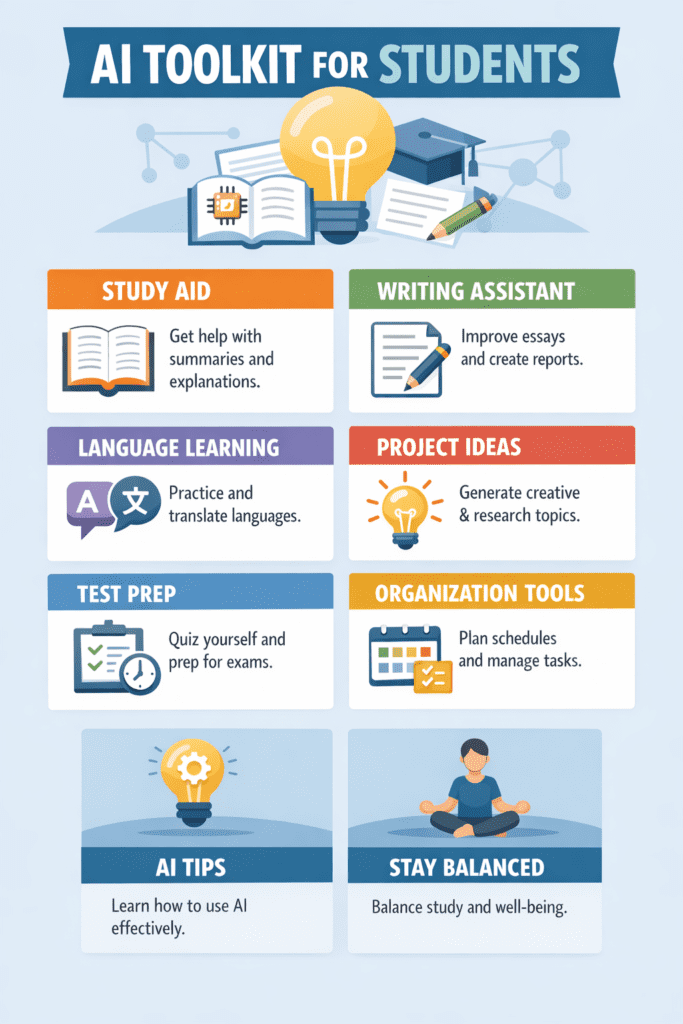
The 7 Key Parts of Every Student’s AI Toolkit
Before we go into the tools, let us understand what a complete Student’s AI Toolkit should cover.
Every student needs help in these 7 areas.
The first area is writing and editing. This includes essays, assignments, emails, and reports.
The second area is research and summarising. This means finding information fast and understanding it quickly.
The third area is note-taking and organising. This means keeping all your notes clean and easy to find.
The fourth area is studying and memorising. This includes flashcards, quizzes, and revision tools.
The fifth area is time management and planning. This includes schedules, deadlines, and task lists.
The sixth area is reading and comprehension. This means understanding long documents and textbooks faster.
The seventh area is creativity and presentations. This includes slide decks, visuals, and creative projects.
If your toolkit covers these 7 areas, you are ready for anything university or school throws at you.
Part 1: AI Writing Tools for Students — Write Better, Write Faster
Writing is the biggest part of student life. Essays. Reports. Research papers. Emails to professors. Cover letters for internships.
And yet, most students dread it.
The blank page is scary. Starting is hard. Getting the words right takes forever.
That is where AI writing tools come in.
Best AI Writing Assistant for Students in 2026
ChatGPT (Free and Plus versions)
ChatGPT is the most popular AI writing tool in the world right now. And it is perfect for students.
Here is how to use it step by step.
Step 1: Open ChatGPT at chat.openai.com. You can use the free version.
Step 2: Tell it what you need. Be specific. Do not just say “write an essay.” Say “Help me write a 500-word essay introduction about climate change for a high school science class.”
Step 3: Read what it gives you. Do not copy it directly. Use it as a starting point. Change the words. Add your own ideas.
Step 4: Ask it to improve your own writing. Paste your paragraph and say “Make this clearer and more academic.”
Step 5: Use it to fix grammar. Paste any sentence and say “Fix the grammar and punctuation.”
This is one of the most powerful long-tail keyword areas students search for: “how to use ChatGPT for writing essays without getting caught.” The answer is simple. Use it as a helper, not a writer. Let it guide you, but write with your own voice.
[1] Grammarly
Grammarly is the best student’s AI writing tool for fixing grammar, spelling, and tone. It works inside Google Docs, Microsoft Word, and even your browser.
The free version is great. The premium version helps with clarity and plagiarism too.
Pro tip: Use Grammarly’s tone checker. It tells you if your essay sounds too casual for an academic setting. This alone can raise your grade.
[2] Hemingway Editor
This free tool makes your writing simple and bold. It highlights long sentences, passive voice, and hard words.
If your professor says “your writing is too complex,” the Hemingway Editor is your fix.
Part 2: AI Research Tools for Students — Find Information 10x Faster
Research is the part of studying that eats up the most time.
You open 20 tabs. You read half of each one. You forget where you found what. You end up more confused than when you started.
Sound familiar?
These AI research tools in your Student’s AI Toolkit will change all of that.
Top AI Research Tools Every Student Should Know
[1] Perplexity AI
Perplexity AI is like Google but smarter. Instead of showing you a list of links, it reads the web and gives you a clear answer with sources cited.
This is gold for students.
Step 1: Go to perplexity.ai. It is free.
Step 2: Type your research question like you would ask a teacher. For example: “What are the main causes of the 2008 financial crisis?”
Step 3: Read the answer. It comes with citations. Click on each source to read more.
Step 4: Use the “Focus” feature to search only academic papers or news.
This tool is one of the best AI tools for student research in 2026. Students who use it report cutting their research time by 60%.
[2] Consensus
Consensus is a search engine that searches only peer-reviewed research papers. If you need scientific evidence for your argument, this is your tool.
Instead of wading through Google Scholar and not understanding anything, Consensus gives you a plain-English summary of what the research says.
This is perfect for science, medicine, psychology, and social science students.
[3] Elicit
Elicit is another AI research tool that helps you find, summarise, and organise research papers. It is especially useful for literature reviews and dissertations.
You type in a research question. It finds relevant papers. It pulls out the key findings. It even helps you spot gaps in the research.
Part 3: AI Note-Taking Tools for Students — Never Lose an Important Idea Again
You are in a lecture. Your professor is talking fast. You are writing notes. But you are missing half of what they say because you cannot write and listen at the same time.
Every student knows this frustration.
AI note-taking tools in your Student’s AI Toolkit solve this completely.
Best AI Note-Taking Apps for Students
[1] Notion AI
Notion is already one of the best note-taking apps in the world. But with Notion AI added on, it becomes something else entirely.
Here is how students use Notion AI.
Step 1: Set up a free Notion account at notion.so.
Step 2: Create a page for each subject. Call them “Biology Notes,” “History Notes,” etc.
Step 3: Paste your rough lecture notes into Notion.
Step 4: Use Notion AI to summarise them. Click “Ask AI” and say “Summarise these notes in 10 bullet points.”
Step 5: Ask AI to turn your notes into a study guide. Say “Create a study guide from these notes with key terms and definitions.”
This is one of the most searched student productivity tips for 2026. And it works.
[2] Otter.ai
Otter.ai records lectures and meetings and turns speech into text automatically.
You just open Otter, press record, and sit back. After the lecture, you have a full written transcript.
Then Otter uses AI to highlight key points, create summaries, and let you search for specific things you heard.
This is a game changer for students with auditory learning styles or those studying in a second language.
[3] Obsidian with AI Plugins
Obsidian is a free note-taking app that links your ideas together like a brain map. With AI plugins, it can suggest connections between your notes, help you find old information, and even quiz you on what you have written.
Advanced students love this tool because it grows with you. The more notes you add, the smarter it gets at helping you find links.
Part 4: AI Study Tools for Students — Remember More, Forget Less
Studying is not just about reading. It is about remembering.
Most students read something three times and still forget it in the exam. This is because passive reading does not work well for memory.
Active recall does. And AI makes it easier than ever.
AI Flashcard and Quiz Tools for Students
[1] Anki with AI Add-ons
Anki is the king of flashcard apps. It uses spaced repetition, which means it shows you cards you are about to forget right before you forget them. This is proven by science to improve memory by up to 200%.
Add AI to the mix and it becomes even more powerful.
Step 1: Download Anki free at apps.ankiweb.net.
Step 2: Create a deck for each subject.
Step 3: Use the AnkiGPT add-on to create flashcards from your notes automatically. Paste your notes and it generates questions and answers.
Step 4: Study for just 15 to 20 minutes per day. Anki will tell you what to review.
Step 5: Watch your exam scores go up.
This is one of the most effective AI tools for exam preparation that students are using right now.
[2] Quizlet
Quizlet is one of the most popular study apps for students around the world. In 2026, it has powerful AI features.
You can paste your notes into Quizlet and it will automatically create flashcards, matching games, quizzes, and written tests.
The AI also helps you focus on what you do not know yet. It tracks your progress and adapts to your weaknesses.
[3] Khanmigo by Khan Academy
Khan Academy has always been free and brilliant. Their AI tutor called Khanmigo makes it even better.
Instead of just watching videos, you can now have a real conversation with the AI tutor. You can ask it to explain things in a simpler way. You can ask follow-up questions. You can tell it what you are confused about.
This is like having a personal tutor available 24 hours a day, 7 days a week, for free.
Part 5: AI Time Management Tools for Students — Stop Procrastinating, Start Winning
Be honest with yourself.
How much time do you spend scrolling your phone when you should be studying? How many times have you pulled an all-nighter because you left things too late?
Time management is the hidden skill that separates A students from average students.
And AI tools can help.
AI Planning and Productivity Tools for Students
[1] Motion
Motion is an AI-powered calendar and task manager. You tell it your tasks and deadlines. It automatically builds your daily schedule based on your priorities, energy levels, and available time.
If something changes, it reshuffles your whole day in seconds.
This is perfect for students who have multiple assignments, part-time jobs, and social lives to balance.
[2] Reclaim.ai
Reclaim.ai connects to your Google Calendar and automatically blocks time for your study sessions, breaks, and habits.
It makes sure you have deep focus time scheduled every day. It also protects your sleep time so you do not overcommit.
[3] Forest App with AI Features
Forest is a focus timer app that gamifies your study sessions. You plant a virtual tree. If you leave the app to check social media, the tree dies.
It sounds simple. But it works incredibly well.
In 2026, Forest now uses AI to suggest your best focus times based on your past performance. It learns when you are most productive and schedules your hardest work then.
Part 6: AI Reading Tools for Students — Understand Anything in Minutes
You have a 50-page research paper due tomorrow. You need to read 3 textbook chapters before class. And you have not started either.
This is every student’s nightmare.
AI reading tools in your Student’s AI Toolkit make this manageable.
Best AI Reading and Summarising Tools for Students
[1] ChatPDF
ChatPDF lets you upload any PDF — a textbook chapter, a research paper, a lecture slide — and then ask questions about it.
Step 1: Go to chatpdf.com. It is free.
Step 2: Upload your PDF file.
Step 3: Ask it anything. “What is the main argument of this paper?” “Summarise chapter 3 in 5 bullet points.” “What evidence does the author use to support their point?”
Step 4: Use the answers to guide your reading. Focus on the sections that matter most.
This is one of the most useful AI tools for reading academic papers fast. Students who use it spend 70% less time on reading tasks.
[2] Summarize.tech
This free tool summarises long YouTube videos. For students who use YouTube to learn, this is brilliant.
Paste in any educational YouTube video URL. It gives you a full written summary.
No more watching a 45-minute lecture video when you just need the main points.
[3] Speechify
Speechify converts any text into audio. You can upload PDFs, paste text, or even point it at a webpage.
Then it reads it aloud to you at up to 4.5 times normal speed.
This is perfect for students with dyslexia, visual fatigue, or those who learn better by listening. It is also great for reviewing notes while you are walking or cooking.
Part 7: AI Presentation and Creative Tools for Students — Stand Out in Every Class
Your content might be brilliant. But if your presentation looks boring, professors and classmates will tune out.
AI creative tools help you produce professional-looking work without design experience.
Best AI Creative Tools for Student Presentations
[1] Canva AI
Canva has always been the go-to design tool for non-designers. In 2026, its AI features are extraordinary.
Step 1: Go to canva.com and sign up free.
Step 2: Click on “Presentations” and choose a template.
Step 3: Use the Magic Write feature to generate slide content from a simple prompt.
Step 4: Use the AI image generator to create custom illustrations for your slides.
Step 5: Use the brand consistency tool to make sure all slides match in colour and font.
Your presentations will look like they were made by a professional designer.
[2] Gamma.app
Gamma is an AI tool that creates entire presentations from just one sentence.
You type: “Create a 10-slide presentation about the causes of World War I for a history class.”
Gamma builds it. Full slides. With text. With design. In 30 seconds.
You then customise it. Add your own points. Change the colours. Add citations.
This is one of the fastest AI tools for making student presentations in 2026.
[3] Lumen5
If you need to create a short video for a class project, Lumen5 is your tool. You paste in your text or script. The AI matches it with video clips, images, and music automatically.
The result looks like a proper news report or explainer video. Students use it for social media projects, documentary-style assignments, and science explainers.
How to Build Your Own Student’s AI Toolkit Step by Step
Now you know the tools. But how do you actually build your toolkit without getting overwhelmed?
Here is a simple step-by-step plan.
Step 1: Start with writing and research tools first.
These give you the biggest return on time. Sign up for ChatGPT free, install Grammarly, and bookmark Perplexity AI. Spend one week just using these three.
Step 2: Add a note-taking tool.
Set up a free Notion account. Create folders for each subject. Move all your notes there. This alone will make your student life 10 times more organised.
Step 3: Add one study tool.
Download Anki or set up Quizlet. Create flashcards for your hardest subject. Study for 15 minutes every day.
Step 4: Add a reading tool.
Try ChatPDF on your next reading assignment. See how much faster you can get through it.
Step 5: Add a time management tool.
Even something as simple as Google Calendar with time-blocked study sessions makes a huge difference.
Step 6: Review and adjust every month.
What is working? What is not? Drop tools that you do not use. Add new ones as you discover them.
The goal is not to have every tool. The goal is to have the right tools for you.
Common Mistakes Students Make With AI Tools (And How to Avoid Them)
AI tools are powerful. But they can hurt you if you use them the wrong way.
Here are the most common mistakes and how to avoid them.
Mistake 1: Using AI to write entire essays and submitting them.
This is academic dishonesty. Most universities now have AI detection tools. Getting caught can end your academic career. Always use AI to help you think and edit, not to write everything for you.
Mistake 2: Trusting AI output blindly.
AI tools make mistakes. They sometimes get facts wrong or make up sources. Always verify important information with real sources. Especially for academic work.
Mistake 3: Using too many tools at once.
Starting with 10 different AI tools is overwhelming. You spend more time learning the tools than doing actual work. Start with two or three. Master them. Then add more.
Mistake 4: Not learning prompt writing.
The quality of AI output depends on the quality of your input. If you ask a vague question, you get a vague answer. Learn to write clear, specific prompts. This is one of the most valuable skills you can develop in 2026.
Mistake 5: Replacing thinking with AI.
AI is a helper. Not a thinker. If you let AI do all the thinking, you will not develop your own critical thinking skills. These skills are what employers and professors value most. Use AI to support your thinking, not replace it.
AI Ethics for Students: What You Need to Know
This section is important. Please read it carefully.
Using AI tools as a student comes with real responsibilities.
Every university has an academic integrity policy. Most of them now specifically mention AI tools. Some subjects allow AI use freely. Others ban it completely. Some require you to disclose when you use AI.
Before using any AI tool for academic work, check your institution’s policy. If you are unsure, ask your professor directly. Being transparent is always better than getting caught.
Beyond the rules, there is something else to consider. Your education is an investment in your own mind. If you use AI to skip all the hard parts of learning, you will arrive in your career without the skills you need. Use AI to learn faster. Not to avoid learning.
Free vs Paid AI Tools for Students: What Is Worth Paying For?
Most of the tools in this guide have free versions that are genuinely useful. Here is a quick breakdown of what is worth spending money on.
Free and completely sufficient for most students:
ChatGPT free tier, Grammarly free, Perplexity AI, Otter.ai free tier, Canva free, Anki, Quizlet free, ChatPDF, Khan Academy, Hemingway Editor.
Worth upgrading if you use it heavily:
Grammarly Premium gives you plagiarism checking and deeper style suggestions. This is worth it if you write a lot of essays.
Notion AI costs a few dollars per month and is worth it once you are using Notion daily.
ChatGPT Plus gives you access to GPT-4 and faster responses. If you use ChatGPT every day, the upgrade is worth considering.
Student discounts to know about:
Many AI tools offer student discounts. Always check if there is a student plan before paying full price. Notion, Canva, and several others have free student tiers.
How AI Tools Will Change Student Life by 2027 and Beyond
We are only at the beginning.
In 2026, AI tools are already changing how students study, write, and research. But in the next few years, the changes will be even bigger.
AI tutors will become more personal. They will know exactly what you struggle with and adapt in real time.
AI will help students learn languages up to three times faster by having real conversations and correcting you instantly.
AI will help students with disabilities access education in ways that were not possible before. Better transcription, better reading tools, better visual descriptions.
AI-powered career advisors will analyse your skills and interests and suggest the best career paths for you.
The students who start building their AI toolkit now will be the ones who are ready for all of this.
Student’s AI Toolkit Checklist: Your Quick Start Guide
Here is everything you need in one simple checklist. Save this. Print it. Bookmark this page.
- For writing: ChatGPT, Grammarly, Hemingway Editor.
- For research: Perplexity AI, Consensus, Elicit.
- For note-taking: Notion AI, Otter.ai.
- For studying: Anki with AnkiGPT, Quizlet, Khanmigo.
- For time management: Motion or Reclaim.ai, Forest App.
- For reading: ChatPDF, Summarize.tech, Speechify.
- For presentations: Canva AI, Gamma.app, Lumen5.
Start with one tool from each category. Master it. Then add more as you need them.
Real Student Stories: How AI Toolkit Changed Their Results
These are based on experiences shared by students in online communities and study forums.
One student in her second year of law school said she was spending 8 hours preparing for a single seminar. After adding Perplexity AI and Elicit to her toolkit, she cut that to under 2 hours. Her seminar contributions improved because she had more time to actually think about the material.
Another student studying medicine said he used to fail his anatomy quizzes regularly. He started using Anki with AI-generated flashcards. Within 6 weeks, he was scoring in the top 10% of his class.
A student with dyslexia shared that Speechify changed everything for her. Reading 50 pages used to take her all day and leave her exhausted. Now she listens at 1.5x speed while walking, and she actually retains more.
These are not exceptional cases. They are what happens when any student combines the right tools with consistent effort.
Summary
Here is everything we covered in this guide about the Student’s AI Toolkit for 2026.
A Student’s AI Toolkit is a set of AI tools that helps you study smarter, write better, research faster, and manage your time more effectively.
The 7 key areas your toolkit should cover are writing, research, note-taking, studying, time management, reading, and creativity.
The top writing tools are ChatGPT, Grammarly, and Hemingway Editor.
The top research tools are Perplexity AI, Consensus, and Elicit.
The top note-taking tools are Notion AI and Otter.ai.
The top study tools are Anki, Quizlet, and Khanmigo.
The top time management tools are Motion and Forest App.
The top reading tools are ChatPDF, Summarize.tech, and Speechify.
The top creative tools are Canva AI, Gamma.app, and Lumen5.
Build your toolkit step by step. Start with writing and research. Add one area at a time. Review and adjust monthly.
Avoid common mistakes like using AI to write entire assignments, trusting AI without verifying, and using too many tools at once.
Always follow your institution’s academic integrity policy.
Conclusion
You are living in one of the most exciting times in the history of education.
The tools that used to be available only to people with money, connections, or genius-level talent are now available to every student with a phone or laptop.
The Student’s AI Toolkit for 2026 is not about being lazy. It is about being strategic. It is about using the right tools to unlock more time for deep thinking, creativity, and real learning.
The students who thrive in 2026 and beyond will not be the ones who work the hardest. They will be the ones who work the smartest.
Start small. Pick two tools from this guide today. Use them for one week. See how much easier your student life becomes.
Then keep building.
Your future self will thank you.
Frequently Asked Questions
Is using AI tools cheating?
Not automatically. Using AI to help you understand a topic, improve your grammar, or organise your notes is not cheating. Using AI to write your assignment and submit it as your own work is. Always check your institution’s policy.
Do I need to be tech-savvy to use these tools?
Not at all. Every tool in this guide is designed for regular people, not tech experts. If you can use WhatsApp or Instagram, you can use these tools.
Are these tools safe for my personal data?
Most major AI tools have privacy policies in place. Avoid uploading confidential personal information. For most student work, the standard free accounts are perfectly safe.
What is the best AI tool for writing essays as a student?
ChatGPT combined with Grammarly is the most popular and effective combination. Use ChatGPT to brainstorm, outline, and improve your drafts. Use Grammarly to check grammar, style, and tone.
Can AI tools help me study for exams?
Yes, absolutely. Anki with AI-generated flashcards is the most effective tool for exam preparation. Quizlet is another great option. The key is active recall, not passive reading.
What is the best free AI tool for students?
ChatGPT free tier is the single most useful free AI tool for students in 2026. It handles writing, research, studying, and even coding help all in one place.