Think about this for a second.
You read something amazing this morning. You had a great idea in the shower. You watched a video that changed the way you think about money.
And by tonight? Gone. All of it.
This is not a memory problem. This is a system problem. And there is a fix for it — your very own AI Second Brain.
In this guide, you will learn exactly how to build a personal AI Second Brain from scratch. Step by step. No tech experience needed. No expensive software required.
Just a simple, powerful system that remembers everything so you do not have to.
🚀 Ready to 10x your memory and productivity? Keep reading — this guide will change how you think, work, and learn forever.
Table of Contents
What Is an AI Second Brain? (And Why You Need One Right Now)
An AI Second Brain is a personal digital system that uses artificial intelligence to store, connect, and surface your notes, ideas, and knowledge whenever you need them.
Think of it like a smart notebook that never forgets — and actually helps you think better.
The concept of a Second Brain was first introduced by productivity expert Tiago Forte. He called it a trusted place outside your head where you can store everything important. Now, with AI tools available to everyone, this concept has become 10 times more powerful.
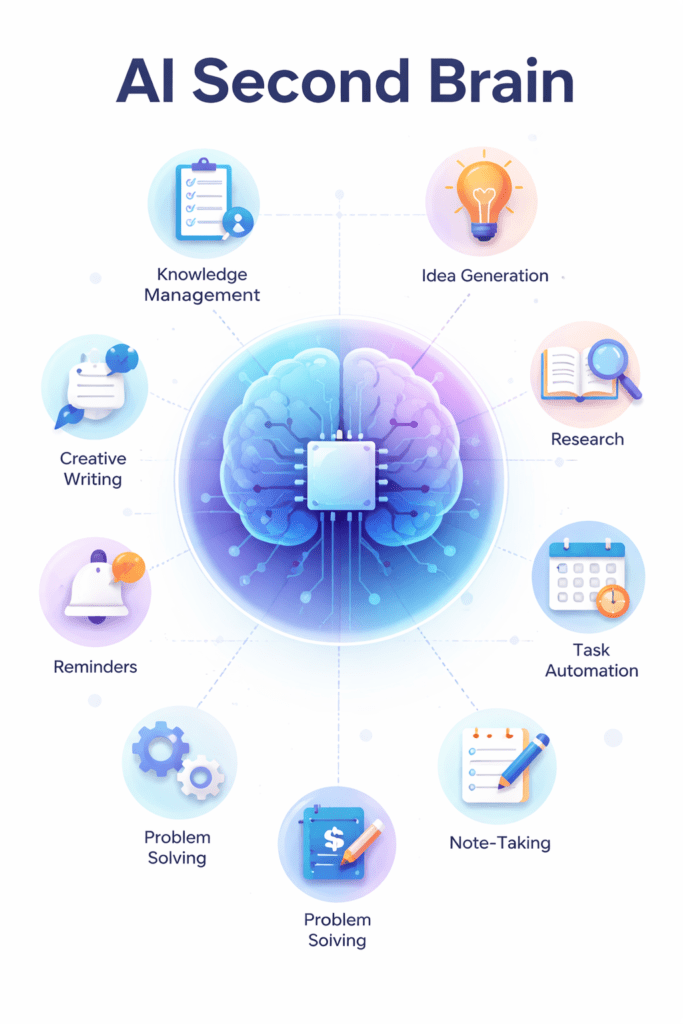
Your personal AI knowledge management system can:
- Save every article, idea, and note you come across
- Connect ideas you would never connect on your own
- Help you write, think, and create faster
- Answer questions using YOUR stored knowledge
- Remind you of things at exactly the right moment
🔥 People using an AI Second Brain report saving 2-3 hours every single day. Imagine what you could do with those extra hours.
Why Your Brain Was Never Designed to Remember Everything
Your brain is incredible. But it was not built to store information. It was built to process it.
Scientists call this the “forgetting curve.” Within 24 hours, you forget up to 70% of what you learned. Within a week, you forget almost 90%.
That is not a flaw. That is biology. Your brain dumps information to save energy for things that keep you alive.
But here is the problem. In today’s world, information is your biggest asset. The ideas you forget today could have been worth thousands tomorrow.
This is exactly why building a personal AI knowledge base is not optional anymore. It is a career advantage. A creative advantage. A life advantage.
How to Build Your AI Second Brain: Step-by-Step Guide
Let us break this down into simple steps. Follow them in order and by the end, you will have a fully working AI Second Brain.
Step 1 — Choose the Right AI Tools for Your Second Brain
You do not need to spend money to start. There are free AI tools that work amazingly well for building your second brain system.
Here are the best tools for beginners:
- Notion AI — Great for organizing notes and using AI to summarize and search
- Obsidian + AI plugins — Perfect for connecting ideas and building a personal knowledge graph
- ChatGPT or Claude — Excellent for processing, summarizing, and expanding your notes
- Google NotebookLM — A free AI tool that turns your documents into an interactive knowledge base
- Readwise Reader — Captures highlights from articles, books, and newsletters automatically
💡 Pro Tip: Start with just ONE tool. Most people fail because they try too many tools at once. Pick Notion AI or Google NotebookLM and stick with it for 30 days.
Step 2 — Set Up Your Information Capture System
The most important habit in your AI Second Brain is capture. If you do not capture information, nothing else works.
Here is what you need to capture:
- Ideas that pop into your head during the day
- Articles and blog posts you find useful
- YouTube videos with key lessons
- Book highlights and quotes
- Meeting notes and action items
- Things people say that make you think
The golden rule of capture is this: if it matters to you, capture it. Do not filter. Do not judge. Just save it.
Use a tool like Readwise to automatically sync your Kindle highlights. Use the Notion Web Clipper to save articles in one click. Use your phone’s voice memo app to capture ideas on the go.
💡 Pro Tip: Create a single inbox in your note-taking app. Everything goes in here first. You organize it later. Right now, just capture.
Step 3 — Organize Your Notes with the PARA Method
Now that you are capturing information, you need a simple way to organize it. The best method for this is PARA — created by Tiago Forte.
PARA stands for:
- P — Projects: Active things you are working on right now
- A — Areas: Ongoing parts of your life (health, finance, relationships)
- R — Resources: Topics and interests you want to learn more about
- A — Archive: Completed things you want to store but not see every day
This is a game-changing framework for personal AI knowledge management. It keeps things simple and stops your second brain from becoming a messy pile of notes.
Inside each section, you use AI to help you tag, summarize, and connect your notes.
Step 4 — Use AI to Process and Connect Your Ideas
This is where the magic happens. This is what separates a regular note-taking app from a true AI Second Brain.
Once you have notes stored, use AI to:
- Summarize long articles into 3 key takeaways
- Find connections between notes you wrote months apart
- Turn bullet-point notes into full paragraphs
- Answer questions using only your stored knowledge
- Generate new ideas by combining existing ones
For example, paste a 5,000-word article into ChatGPT and ask: “Summarize this in 5 bullet points and tell me how it connects to personal finance.” You will get a response in seconds that would have taken you 30 minutes to produce yourself.
Tools like Google NotebookLM let you upload your entire personal document library and then chat with it. You can ask things like “What did I write about goal setting last year?” and get an instant, accurate answer from YOUR own notes.
💡 Try this today: Open Google NotebookLM for free, upload 5 of your old documents or notes, and ask it a question. You will be amazed at what happens.
Step 5 — Build Your Daily Review Habit
A second brain is not something you set up once and forget. You need to review it regularly. But here is the good news — with AI, this takes less than 10 minutes a day.
Here is a simple daily review routine:
- Open your inbox and process new captures (5 minutes)
- Ask your AI to show you notes related to your current project
- Add any new connections or thoughts that come up
- Mark one insight you want to use this week
Do this daily review every morning or evening. After just 30 days, you will notice something incredible happening — you will start thinking in patterns. You will connect ideas faster. You will feel more creative and less overwhelmed.
Step 6 — Create Output from Your AI Second Brain
The whole point of capturing and organizing knowledge is to use it. Your AI Second Brain is not a library. It is a factory.
Here are ways to use your second brain to create real output:
- Write blog posts and articles using your saved research
- Prepare for meetings using your stored insights
- Build presentations from your connected notes
- Create social media content from your best ideas
- Make better decisions using saved lessons from past experiences
Ask your AI tool to “draft a short blog post on X using my stored notes.” You will have a first draft in minutes. Then you edit and publish. This is how smart creators are producing more content than ever before.
Best AI Tools to Build Your Second Brain in 2025
Here is a quick comparison of the top tools you can start using today:
- Google NotebookLM — Free, easy to use, amazing for uploading your own documents and chatting with them. Best for beginners.
- Notion AI — Great all-in-one workspace. Paid plan needed for AI features. Best for people who already use Notion.
- Obsidian + Smart Connections plugin — Free and powerful. Best for people who love control and customization.
- Mem.ai — AI-first note-taking tool that automatically organizes your notes. Great for busy professionals.
- Readwise Reader + ChatGPT — Powerful combo for processing and reviewing saved articles. Best for heavy readers.
💡 Pro Tip: You do not need all of these. One tool used consistently is worth more than five tools used poorly. Start simple.
Common Mistakes People Make When Building an AI Second Brain
Most people try this and give up. Here is why — and how you can avoid making the same mistakes.
Mistake 1: Trying to organize before capturing. Get information in first. Organize later. The capture habit comes first.
Mistake 2: Making it too complicated. If your system takes more than 30 seconds to use, you will abandon it. Keep it simple.
Mistake 3: Using too many tools. Pick one main home for your second brain. Everything else feeds into it.
Mistake 4: Never reviewing. Information you never review is useless. Set a daily 5-minute review and protect that time.
Mistake 5: Saving everything. Yes, capture liberally. But delete things that no longer resonate. Your brain needs signal, not noise.
Real-World Examples: How People Use Their AI Second Brain
Let us look at some real scenarios to make this concrete.
A Freelance Writer
She uses Readwise to save highlights from every article she reads. Once a week, she pastes her highlights into ChatGPT and asks it to find common themes. These themes become her best article ideas. She has published 3x more content since starting her AI Second Brain six months ago.
A Small Business Owner
He uses Google NotebookLM to upload his meeting notes, customer feedback, and industry reports. When he needs to make a decision, he chats with his second brain and gets a summary of everything relevant. He says it is like having an assistant who has read every document in his company.
A Student
She uploads her lecture notes and textbook PDFs into NotebookLM. Before exams, she asks it questions about the topic instead of rereading everything. Her grades improved significantly in one semester.
🎯 No matter who you are — writer, business owner, student, or just someone who wants to think better — an AI Second Brain will change your life. Start today.
How to Use Your AI Second Brain for Specific Goals
[1] Using AI Second Brain for Content Creation
If you are a content creator, blogger, or YouTuber, your second brain becomes your creative engine. Every idea you capture becomes a potential piece of content. AI helps you connect dots between ideas and turn notes into scripts, posts, and videos faster than ever.
[2] Using AI Second Brain for Personal Development
Capture every book lesson, podcast insight, and self-improvement tip you come across. Ask your AI to help you find patterns in what you are learning. Over time, you build a deeply personalized personal development knowledge base that reflects your unique journey.
[3] Using AI Second Brain for Work and Career
Save every meeting note, performance review, and professional insight. When you need to write a resume, prepare for an interview, or make a case for a raise, your second brain has all the evidence ready. This is one of the most underused career advantages available today.
[4] Using AI to Organize Personal Knowledge
Beyond work, your second brain can hold recipes you love, travel plans, health notes, relationship advice, and anything else that matters to you. Think of it as a personal Wikipedia built entirely around YOUR life.
How to Start Your AI Second Brain Today (Even If You Are Busy)
You do not need a perfect plan. You do not need to read 10 more articles. You just need to start.
Here is your 15-minute quick start plan:
1. Go to notebooklm.google.com and create a free account (5 minutes)
2. Upload 3 documents — your resume, one article you saved, one set of notes (5 minutes)
3. Ask it one question about what you uploaded (2 minutes)
4. Create a new note and write down what surprised you (3 minutes)
That is it. You just built the first version of your AI Second Brain. From here, you grow it every day by adding to it.
🌟 The best time to build your AI Second Brain was a year ago. The second best time is right now.
Summary
Here is a quick recap of everything covered in this step-by-step guide to building your AI Second Brain:
- An AI Second Brain is a digital system that uses AI to store, connect, and surface your knowledge
- Your brain was not designed to remember everything — a second brain fills this gap
- The 6 key steps: Choose tools, Set up capture, Organize with PARA, Use AI to connect ideas, Build a daily review, Create output
- Best tools include Google NotebookLM, Notion AI, Obsidian, Mem.ai, and Readwise
- Avoid the 5 most common mistakes: over-organizing, using too many tools, and never reviewing
- Anyone can start in 15 minutes with zero tech skills
Conclusion
You are living in the most information-rich time in human history. Every day, incredible ideas pass through your mind. And every night, most of them disappear forever.
An AI Second Brain changes that. It gives you a place to put everything. It helps you see connections you would never see alone. It turns scattered notes into clear thinking and clear action.
The people building their AI Second Brains right now are not smarter than you. They just have a better system. And now you do too.
You have the guide. You have the tools. You have the steps.
The only thing left is to start.
✅ Take your first step right now — visit notebooklm.google.com and upload your first document. Your AI Second Brain is waiting to be built. Go build it.
Frequently Asked Questions
What is the best free AI Second Brain tool?
Google NotebookLM is the best free tool to start with. It lets you upload your own documents and chat with them using AI. It is completely free and requires only a Google account.
How long does it take to build an AI Second Brain?
You can set up a basic version in 15 minutes. But building a truly powerful second brain is an ongoing process. Most people start seeing real benefits within 30 days of consistent use.
Do I need to be tech-savvy to use an AI Second Brain?
Not at all. Tools like Notion AI and Google NotebookLM are designed for regular people. If you can type and click, you can build your second brain.
Is an AI Second Brain safe and private?
Most tools let you control your privacy settings. For sensitive information, tools like Obsidian store everything locally on your computer — no cloud required.
How is an AI Second Brain different from regular note-taking?
Regular note-taking is passive. You save things and hope to find them later. An AI Second Brain is active. AI helps you connect, summarize, and use your notes in ways that a regular notebook never could.