What if you could get twice as much done every single day — without working extra hours?
That sounds like a dream, right? But thousands of people are already living that dream. And they all have one thing in common.
They use an AI daily routine.
Not just any routine. A smart, step-by-step AI-powered schedule that handles the boring stuff, speeds up deep work, and frees up your brain for things that actually matter.
In this post, you will learn exactly how to build an AI daily routine that can 2X your productivity — even if you have never used AI tools before.
Let’s get into it.
Table of Contents
What Is an AI Daily Routine and Why Does It Matter?
An AI daily routine is a structured daily schedule where you use AI tools to help you work smarter, not harder.
Think of it like having a personal assistant who never sleeps, never complains, and always has your back.
With the right AI productivity routine for beginners, you can plan your tasks faster, write content in less time, organize your emails, brainstorm ideas on demand, and make better decisions without mental exhaustion.
That’s the power of adding AI to your daily work habits.
And here’s the best part — you don’t need to be a tech expert. If you can type a message, you can use AI tools.
Why Most People Struggle With Productivity (And How AI Fixes It)
Let’s be honest. Most people lose 2 to 3 hours every day to things like:
- Writing the same kind of emails over and over
- Staring at a blank page trying to start a task
- Spending too long on research that takes forever
- Forgetting to do important things because there is no system
These are not laziness problems. These are workflow problems.
An AI-assisted daily schedule fixes these by putting the right tool in the right place at the right time.
When you use AI daily productivity tips the right way, your brain stops doing low-value tasks. It starts focusing only on high-value thinking. That’s when real productivity happens.
The 7-Step AI Daily Routine That Can 2X Your Productivity
Here is a simple, proven framework you can start using today. Each step is designed to remove friction and save time.
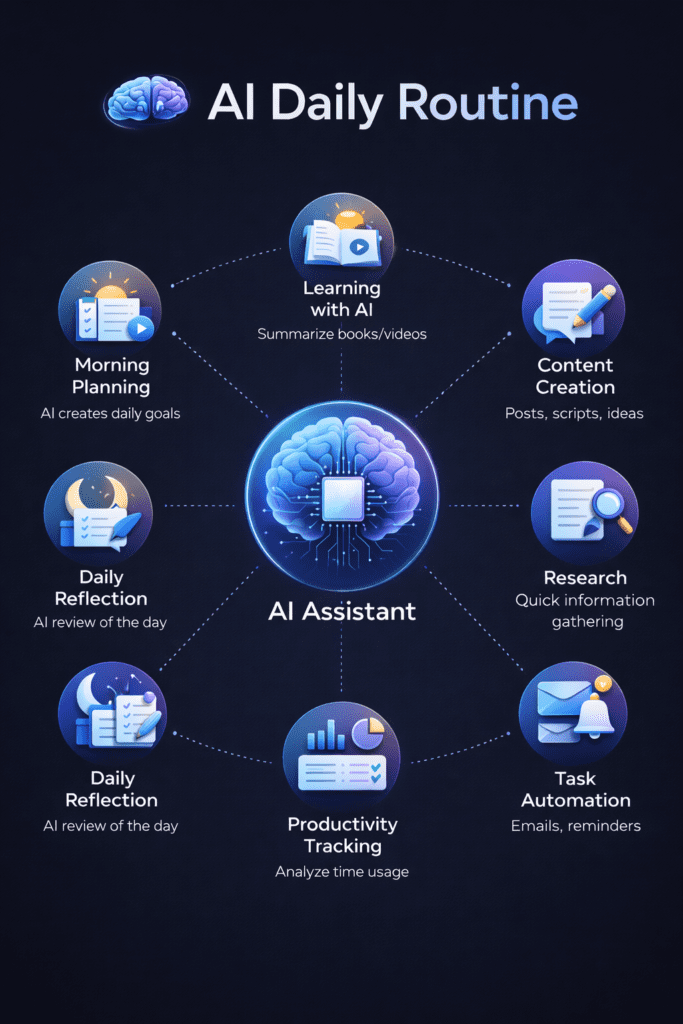
Step 1 — Start Your Morning With an AI Brain Dump (7:00 AM – 7:15 AM)
Before you check your phone or email, open your AI tool of choice — like ChatGPT, Claude, or Gemini.
Tell it everything on your mind. Your tasks, your goals, your worries, whatever is cluttering your head.
Then ask it to organize everything into a clear priority list.
This is called an AI morning productivity routine. It takes 15 minutes but saves hours of mental fog throughout the day.
Example prompt you can use:
“Here are all the things I need to do today: [list them]. Help me organize them by priority and tell me which 3 I should focus on first.”
You will feel lighter and more focused within minutes.
Step 2 — Use AI to Plan Your Deep Work Blocks (7:15 AM – 7:30 AM)
Deep work is when you do your most important, focused tasks. No distractions. No multitasking.
The problem is most people don’t plan when to do deep work. They just react to whatever comes up.
With an AI-powered work schedule, you can ask your AI assistant to block time for your top 3 tasks and even suggest how long each one will take based on your workload.
This is one of the best AI time management strategies for busy professionals because it forces you to protect your best hours.
Pro tip: Do deep work in your first 3 hours. That’s when your brain is sharpest.
Step 3 — Let AI Handle Your Email and Messages (9:00 AM – 9:30 AM)
Most people spend 28% of their workday on email. That’s over 2 hours every single day.
Here’s how to take that back.
Use AI tools like ChatGPT or Gmail’s AI features to:
- Summarize long email threads in seconds
- Draft professional replies in your tone
- Sort messages by urgency
- Write follow-up emails that don’t sound robotic
When you use AI to automate repetitive work tasks like emails, you reclaim 60 to 90 minutes every day. That adds up to 7+ hours every week.
Now imagine what you could do with 7 extra hours.
Step 4 — Use AI for Research and Content Creation (10:00 AM – 12:00 PM)
Whether you write blogs, reports, social media posts, or presentations, AI can cut your creation time in half.
Here’s how to use AI for daily content creation:
- Ask AI to research a topic and give you key points
- Use it to create a first draft you can edit
- Generate headline options, subheadings, and outlines
- Check for grammar, tone, and clarity
This is not cheating. This is smart working. You still bring the ideas, the creativity, and the final polish. AI just removes the blank-page panic.
Using AI writing tools in your daily workflow is one of the most underrated AI productivity hacks for content creators in 2025 and beyond.
Step 5 — Take a Midday Reset Using AI Journaling (12:30 PM – 12:45 PM)
Your brain needs a break. But most people scroll social media, which doesn’t actually rest the mind.
Instead, try AI journaling. Spend 10 to 15 minutes talking to your AI assistant about how your morning went.
Ask questions like:
- What tasks did I finish?
- What slowed me down?
- What should I change this afternoon?
This micro-reflection habit builds self-awareness and keeps you on track. Many top performers use daily AI journaling prompts for better self-reflection as part of their routine.
It takes 15 minutes but gives you a completely different afternoon.
Step 6 — Use AI to Tackle Admin, Planning, and Low-Brainwork (2:00 PM – 3:30 PM)
Your energy naturally dips in the early afternoon. This is not the best time for deep work.
But it’s perfect for AI-assisted tasks like:
- Scheduling meetings and follow-ups
- Generating reports or summaries
- Creating templates for repeated tasks
- Updating spreadsheets or databases with AI tools
By using AI productivity tools for small business owners and professionals during this window, you clear your plate without burning out your brain.
Think of it as working with the flow of your energy, not against it.
Step 7 — End Your Day With an AI-Powered Review (5:00 PM – 5:20 PM)
Before you shut down, spend 20 minutes reviewing your day with AI.
Ask your AI assistant to help you:
- Summarize what you accomplished today
- Identify what didn’t get done and why
- Draft tomorrow’s priority task list
- Flag anything that needs follow-up
This end-of-day AI review routine is what separates high-performers from average workers. You go to sleep with a clear head and wake up with a clear plan.
No more lying awake thinking about unfinished tasks.
Best AI Tools to Include in Your Daily Routine
You don’t need 20 different AI tools. You just need the right ones. Here are the top AI tools for daily productivity in 2026:
For Writing and Thinking
- ChatGPT — great for drafts, brainstorming, and planning
- Claude by Anthropic — excellent for long content, analysis, and nuanced thinking
- Gemini — integrates well with Google Workspace tools
For Email and Communication
- Superhuman — AI-powered email tool that helps you reach inbox zero
- Lavender — AI email coaching for sales and outreach
- Otter.ai — turns meetings into transcripts automatically
For Task and Time Management
- Notion AI — great for notes, tasks, and project planning
- Motion — uses AI to automatically schedule your tasks
- Reclaim.ai — AI calendar tool that protects your deep work time
For Research and Learning
- Perplexity AI — AI-powered search that gives sourced answers fast
- Elicit — great for research and reviewing studies
- Consensus — finds evidence-based answers from research papers
The key is to not use all of them at once. Pick one or two tools per category and build from there.
Common Mistakes to Avoid When Building an AI Daily Routine
A lot of people try to use AI and then give up after a week. Here’s why — and how to avoid it.
Mistake 1 — Trying to Automate Everything at Once
Start small. Pick one part of your day — like email or task planning — and add AI there first. Once that feels natural, add more.
Mistake 2 — Using AI Without Clear Prompts
AI is only as good as your instructions. Vague prompts get vague results. Be specific about what you want, the format you want it in, and the tone you prefer.
Mistake 3 — Not Reviewing AI Output
AI makes mistakes. Always review what it gives you before using it. Treat AI like a very smart intern — helpful, but needs oversight.
Mistake 4 — Skipping the Human Touch
AI handles the mechanics. You provide the heart, the strategy, and the judgment. Never remove yourself from the equation.
Mistake 5 — Not Being Consistent
A routine only works when you stick to it. Give your AI daily routine at least 21 days before you judge whether it’s working.
How an AI Daily Routine Helps People With Low Time and High Stress
This section is for you if you are a working parent, a freelancer juggling multiple clients, a student with a part-time job, or a small business owner wearing many hats.
You don’t have the luxury of long work sessions. You need to get more done in less time.
That’s exactly what an AI daily routine for students and working professionals was designed for.
When you use AI to plan your day in the morning, handle emails fast, and review your progress at night — you compress 10 hours of scattered work into 6 hours of focused, intentional output.
That is the real magic.
What Real Productivity Looks Like With AI — A Day in the Life
Let’s imagine a typical day for someone using an AI daily routine properly.
- 7:00 AM — They open ChatGPT on their phone and do a 10-minute brain dump. They have a clear priority list before breakfast.
- 8:00 AM — They sit down for 3 hours of deep, focused work. No email. No calls. Just their #1 priority task.
- 11:00 AM — They spend 30 minutes handling emails using AI drafts. The inbox is clean.
- 12:00 PM — Lunch and a short AI journal session. They feel calm and in control.
- 2:00 PM — They handle all admin, scheduling, and low-effort tasks using AI tools.
- 4:00 PM — One more deep work session using their second priority task.
- 5:00 PM — Quick AI review. They note wins, identify blockers, and set up tomorrow.
Total focused, high-quality work: 6 to 7 hours. Total scattered, reactive work: almost zero.
That is what using AI to improve your work-life balance actually looks like.
Ready to Start Your AI Daily Routine? Here’s What to Do Right Now
You don’t need to redesign your entire life today. Start with these 3 small steps:
- Step 1: Pick one AI tool to try — ChatGPT, Claude, or Gemini. All have free versions.
- Step 2: Tomorrow morning, use it to organize your task list for the day.
- Step 3: In the evening, use it to review what you got done and plan the next day.
Do this for one week straight. That’s it. You will feel the difference.
If you want to go deeper, bookmark this page and come back to it as you add more steps to your routine.
Summary
- An AI daily routine uses AI tools at key points in your day to save time and increase focus
- The 7-step routine starts with a morning brain dump and ends with an AI-powered review
- Top tools include ChatGPT, Claude, Notion AI, Motion, and Reclaim.ai
- Common mistakes include trying to automate too much at once and skipping the human review step
- Even busy people with limited time can benefit from a beginner AI productivity routine
- Start with 3 steps: morning task planning, email handling, and evening review
Conclusion
Here’s the truth nobody talks about.
The difference between someone who gets 5 things done in a day and someone who gets 10 things done is not talent. It’s not even effort.
It’s systems.
An AI daily routine is one of the most powerful systems you can build right now. It works with your natural energy, removes mental clutter, and turns your best hours into your most productive hours.
You don’t need to wait for the perfect moment. You don’t need a fancy setup. You just need to start.
Pick one step from this guide. Try it tomorrow morning. See how it feels.
Then come back and add another step.
Before you know it, you’ll have a full AI productivity system humming in the background every single day — quietly helping you do more, stress less, and actually enjoy your work again.
That’s what an AI daily routine can do for you.
Start today.
Frequently Asked Questions
Is an AI daily routine suitable for beginners?
Yes. You don’t need any technical skills. If you can send a text message, you can use AI tools. Start with ChatGPT or Claude — both are beginner-friendly.
How long does it take to set up an AI-powered daily routine?
You can start in under 15 minutes. The whole routine outlined above takes about 90 minutes spread across a full day.
Can I use AI to plan my week, not just my day?
Absolutely. Weekly AI planning is a great habit. Every Sunday, spend 30 minutes using AI to map out your priorities for the coming week. It’s one of the best AI weekly planning strategies for entrepreneurs and professionals.
Are there AI daily routine apps specifically for this?
Yes. Apps like Motion, Reclaim.ai, and Notion AI are built around AI-assisted scheduling. But you can also build a strong routine using just a general AI tool like ChatGPT or Claude.
Does using AI for productivity actually work or is it overhyped?
It works when used consistently and correctly. The people who see the biggest results are those who treat AI as a tool inside a system — not a magic button. Combined with the right habits, an AI daily routine can genuinely double your output.