Imagine waking up, checking your phone, and seeing three new sales notifications. You didn’t pack a box. You didn’t visit a post office. You didn’t even talk to a customer.
That’s the quiet magic behind selling digital templates online.
No inventory. No shipping. No 3 AM alarm to restock. Just a file you made once, selling again and again while you sleep.
If you’ve ever searched for a way to make money online without showing your face, without dancing on camera, and without spending your own money first, this is it.
In this guide, you’ll learn exactly how to sell digital templates online and build it into a real $1000/month income stream, even if you’re starting with zero followers and zero experience.
Let’s break it down step by step.
Table of Contents
What Are Digital Templates (And Why They’re Suddenly Everywhere)
A digital template is simply a pre-made design file that someone else can customize for their own use.
Think resume templates, Instagram post templates, wedding invitation templates, budget planners, Notion dashboards, or presentation decks.
You design it once. People download it, edit it with their own text and colors, and use it instantly.
That’s it. That’s the whole business model.
The reason digital templates are booming right now is simple. People are busy. They don’t want to design something from scratch. They want something ready-made that just needs a few tweaks.
That “save me time” feeling is exactly what you’re selling.
Why Selling Digital Templates Online Actually Works
Before we get into the steps, let’s talk about why this business model works so well for beginners.
You create the product one time. It can be sold unlimited times without extra effort.
There are no shipping costs, no printing costs, and no storage headaches.
You can start with tools you already have, like Canva, which is free.
It works well alongside a full-time job because everything runs on autopilot once it’s set up.
This is why so many students, stay-at-home parents, and side-hustlers are choosing to sell digital templates online instead of chasing dropshipping or freelancing.
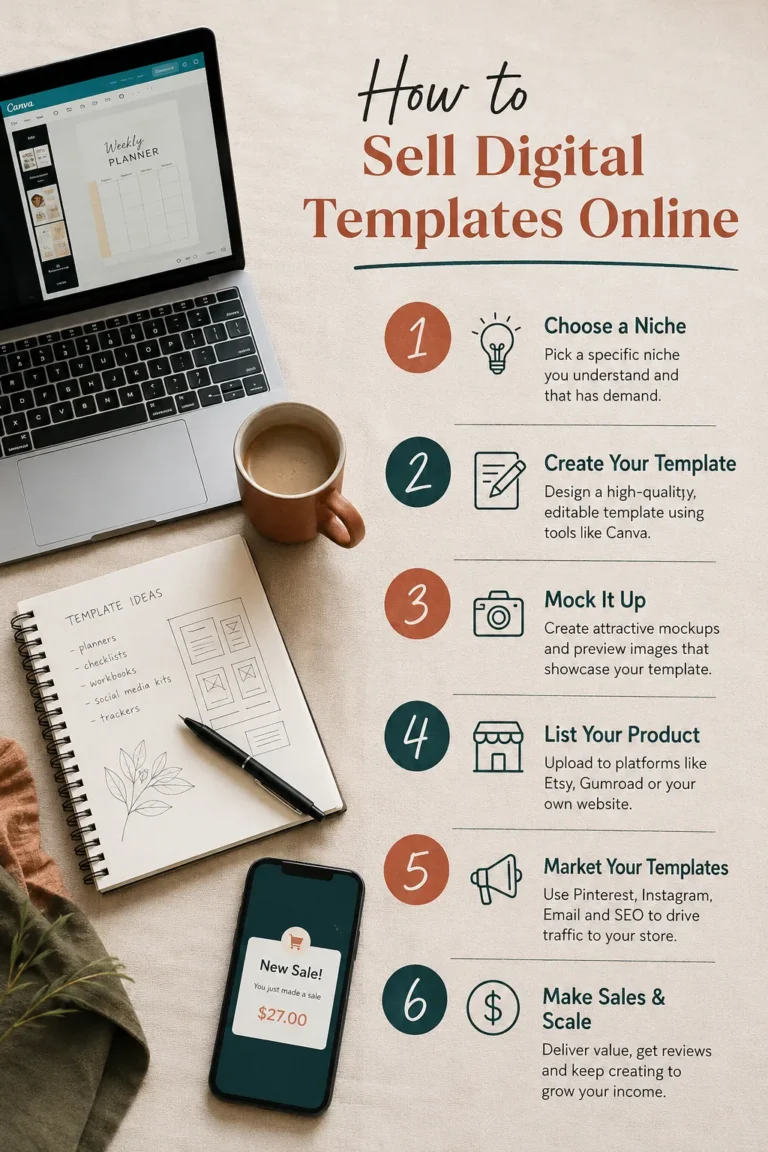
Step 1: Pick a Niche Before You Design Anything
Most beginners make one big mistake. They design first and think about who will buy it later.
Flip that order.
Ask yourself who struggles with a repetitive task and would happily pay a few dollars to skip it.
Some proven niches to sell digital templates online include:
- Small business owners who need invoice and social media templates
- Students who need study planners and resume templates
- Etsy sellers who need packaging and branding templates
- Wedding planners who need invitation and seating chart templates
- Content creators who need Notion planners and YouTube thumbnail templates
Pick one niche to start. Going too broad is one of the fastest ways to confuse your audience and kill your sales before you even launch.
Step 2: Create Templates People Actually Want to Buy
You don’t need to be a professional designer. You need to be observant.
Here’s a simple way to create templates that sell:
- Look at what’s already selling. Browse Etsy or Pinterest and note which digital templates have hundreds of reviews. That’s proof of demand.
- Use beginner-friendly tools. Canva, Google Slides, and Figma all let you build clean templates without any design degree.
- Keep it simple and editable. Buyers want something they can change in five minutes, not something that needs a design course to understand.
- Bundle similar templates. A “Instagram Story Bundle” of 20 templates feels more valuable than one single design, and it lets you charge more.
Start with 5 to 10 templates in your chosen niche before you launch. This gives buyers a real shop to browse instead of a single lonely product.
Tools You Need to Get Started (And Yes, They’re Free)
You don’t need a fancy laptop or a paid subscription to begin this journey.
- Canva handles almost everything, from social media templates to planners and presentation decks. The free plan is more than enough for your first 20 to 30 products.
- Google Fonts gives you access to hundreds of clean, professional fonts that instantly make your templates look more polished.
- Coolors.co helps you pick color palettes that look intentional instead of random, which matters more than people realize when it comes to first impressions.
- Canva’s built-in mockup generator lets you create realistic preview images so buyers can see exactly what they’re getting before they purchase.
None of these tools cost anything to start. You can literally begin today with the browser you’re already using.
Step 3: Choose the Best Platform to Sell Digital Templates Online
This is the step most beginners get stuck on. Here’s a quick comparison so you can decide fast.
| Platform | Best For | Audience Already There? |
|---|---|---|
| Etsy | Beginners wanting instant traffic | Yes, huge built-in buyer base |
| Gumroad | Creators who want full control and low fees | No, you bring your own traffic |
| Creative Market | Designers with polished, high-end templates | Yes, design-focused buyers |
| Your Own Website | Long-term branding and higher profit margins | No, needs SEO and marketing |
If you’re just starting out and have zero traffic, Etsy is usually the smartest first move. It already has millions of buyers actively searching for templates, which means you don’t need an audience to get your first sale.
Once you build some reviews and confidence, you can expand to Gumroad or your own website for better profit margins.
Step 4: Price Your Digital Templates the Smart Way
Pricing feels scary at first, but here’s a simple rule.
Price low enough to feel like a no-brainer purchase, but high enough that ten sales actually feel worth your time.
Most single templates sell well between $3 and $9.
Bundles of 10 to 30 templates can sell anywhere from $12 to $35.
Here’s the real math behind reaching $1000/month.
If you sell a $15 bundle, you only need about 67 sales in a month. That’s roughly 2 sales a day. Once your shop has a few templates and some reviews, this becomes very achievable through search traffic alone.
Step 5: Promote Your Templates Without Spending a Rupee on Ads
You don’t need a big following to sell digital templates online. You need visibility in the right places.
- Pinterest is your best friend. Pinterest works like a visual search engine, not a social feed. A single pin can bring traffic for years, unlike an Instagram post that dies in 24 hours.
- Use SEO inside your product titles. Instead of naming a product “Planner,” name it “Daily Budget Planner Template for Beginners.” This helps you show up in search results, both on Etsy and Google.
- Share your process, not just your product. Short videos showing how you designed a template build trust and curiosity, which leads to sales.
- Ask happy buyers for reviews. Reviews are social proof. More reviews means more strangers trust you enough to click buy.
- Answer questions before they’re asked. Add a short FAQ section to your product listing covering file format, how to edit it, and which apps it works with. This small step reduces hesitation and increases conversions.
Here’s something most beginners miss. You don’t need thousands of visitors to hit $1000 a month. You need the right handful of people who are already searching for exactly what you made. That’s the real power of platforms built around search, like Etsy and Pinterest, compared to social feeds where content disappears within hours.
Step 6: Automate, Reinvest, and Scale to $1000 a Month
Once your first few templates are selling, don’t stop there.
Reinvest your first earnings into creating more templates in the same niche. A shop with 30 to 50 products earns far more than a shop with just 5, because customers who buy one template often come back for more.
Set up automatic delivery so buyers get their files instantly after payment. Most platforms like Etsy and Gumroad do this for you automatically.
Track which templates sell the most and create more designs like them. Let your data guide your next product, not guesswork.
This is how a small side project quietly turns into a full $1000/month passive income stream.
Common Mistakes That Keep Sellers Stuck at Zero Sales
- Launching with only one product and expecting instant sales.
- Ignoring keywords in product titles and descriptions.
- Pricing too high before building any reviews or trust.
- Giving up after the first week because sales didn’t come overnight.
- Copying someone else’s design instead of adding your own small twist, which can hurt trust and even get flagged on marketplaces.
Every successful shop selling digital templates online today started with zero sales too. The difference is they kept showing up, listened to feedback, and improved their listings week after week instead of quitting after a slow start.
Summary
Selling digital templates online is one of the simplest ways to build passive income without spending money upfront.
You pick a niche, design a handful of templates using free tools like Canva, list them on a platform like Etsy, and promote them using Pinterest and smart keywords.
There’s no inventory, no shipping, and no limit on how many times one design can sell.
Final Thoughts
You don’t need to be a professional designer, a marketing expert, or a tech genius to start this journey.
You just need one niche, one template, and one platform to begin.
Start small this week. Create your first template, list it, and let it start working for you while you sleep.
That first sale notification feels incredible. And once it happens, you’ll realize $1000 a month isn’t a dream, it’s just a matter of showing up and repeating the process.
So, what template will you create first?
Frequently Asked Questions
How much can I really earn selling digital templates online?
Earnings vary, but many sellers report reaching $500 to $1000 a month within three to six months of consistent effort, especially when they focus on one niche and keep adding new templates.
Do I need Canva or Photoshop to make digital templates?
No. Canva’s free version is enough to create professional-looking templates. You don’t need expensive software or advanced design skills to start.
Which platform is best for beginners to sell digital templates online?
Etsy is usually the easiest starting point because it already has buyers actively searching for templates, so you don’t need your own traffic on day one.
How do I get my first sale fast?
Price your first product affordably, use clear and keyword-rich titles, and share your product on Pinterest, since it drives long-term search traffic.
Is selling digital templates still profitable in 2026?
Yes. Demand for ready-made templates keeps growing as more people run online businesses, content pages, and side hustles that need quick, professional designs.
How many templates should I have before I expect regular sales?
Aim for at least 15 to 20 listings. A wider catalog gives search platforms more chances to show your products and gives buyers more reasons to purchase more than one item from you.
Can I sell digital templates without showing my face or having social media?
Yes. Many successful template sellers never post a single face photo. Your product design and clear, keyword-rich listings do the selling for you.